
FAQs
Donors
RoundUp.org is how you turn everyday purchases into reliable, monthly, recurring support for your favorite nonprofit - making generosity a simple, automatic part of your daily life.
RoundUp.org is an Approved Financial Partner of Visa and Mastercard that enables donors to designate their Visa/Mastercard to round up every purchase for any nonprofit you choose (even your local school, church, or pet shelter that impact your local community) - turning any Visa or Mastercard into a daily force for good.
Isn’t it time to stop rounding up for the charity chosen by your grocery store, and start rounding up for the nonprofit you care about most?
Getting started
-
What is RoundUp.org?
RoundUp.org is an approved financial partner of Visa and Mastercard that lets you automatically round up everyday credit-card purchases and donate your spare change to any nonprofit you care about. It is the only way to directly link your credit card to a nonprofit of your choosing, turning everyday spending into predictable, recurring impact.
-
How does RoundUp.org work?
Choose a nonprofit on RoundUp.org and link an eligible Visa or Mastercard and go about your normal spending. Each purchase rounds up to the next dollar. On the 1st of each month, your card is charged once for the total round ups accrued during the prior month. Your donation is then distributed to your selected nonprofit through Our Change Foundation, a U.S. 501(c)(3) donor-advised fund.
-
How do I choose a nonprofit?
You can search for a nonprofit on RoundUp.org or use a nonprofit’s unique link or QR code to access their listing directly.
-
Can I change the nonprofit I support?
Yes. You can change your supported nonprofit at any time. Your donation will go to the nonprofit selected as of the last day of the month.
-
Can I round up for multiple nonprofits?
Currently, RoundUp.org supports giving to one nonprofit at a time, but you may switch nonprofits whenever you like.
-
Can I get other people to round up for my favorite nonprofit?
Absolutely! Every nonprofit listing on RoundUp.org offers easy ways to share a link to the listing via social media, email, text, or even via a QR code. Regardless of how you spread the word, all links will take prospective donors back to your favorite nonprofit’s listing, where the donor can sign up and join the cause!
Your card and donation amount
-
Which card should I enroll?
Enroll your primary spending card - a Visa or Mastercard. That will ensure that more of your purchases will share spare change with your favorite nonprofit.
-
Why doesn’t RoundUp.org work with PayPal, Venmo, or American Express?
Today, only Visa and Mastercard provide the transaction-level data required to calculate round ups accurately.
-
How much will I donate each month via rounding up?
It depends on your spending. Most donations end up being between $25 and $35 per month, but you can always set a monthly ‘cap’ on the donation amount, and it will never exceed your budget.
-
Can I set a maximum monthly donation?
Yes. You can set, change, or remove a monthly cap at any time. Your donation will never exceed the cap you set.
-
Is there a minimum monthly donation?
Yes. There is a $10 minimum monthly donation. If your accrued round ups total less than $10 in a given month, your card will be charged the $10 minimum.
-
What happens if my purchases don’t generate enough round ups?
If your round ups total less than $10 for the month, the $10 minimum donation applies.
-
What happens when a purchase ends in $.00?
If a purchase already ends in $X.00, the round up amount will be $1.00 for that transaction.
-
How does RoundUp.org cover its costs?
RoundUp.org retains $2 from each monthly donation as a fundraising expense. Nonprofits never pay to participate.
There are also third-party costs associated with processing each donation. These include credit card processing fees, fees to securely obtain transaction data used to calculate roundups, and fees to process and distribute donations to nonprofits by ACH or check. These expenses are also paid out from the donated amount. Together, they total a maximum of $1.30 + 4.8% of each donation, but that amount could be lower depending on the volume of donations processed.
After all fees and processing costs, about 85% of the average donation goes to the nonprofit.
Billing and receipts
-
When will my card be charged?
Your card is charged once per month, typically on the 1st of the calendar month, for the total round ups from the prior month.
-
What does the charge look like on my statement?
Charges appear as ROUNDUP.ORG
-
Are my Round ups tax-deductible?
Yes. Donations are made to your selected nonprofit through Our Change Foundation, a registered 501(c)(3) donor-advised fund. You will receive a tax receipt each month once your donation is processed and receipts are always available on your online account dashboard.
Privacy and security
-
Can I donate anonymously?
Yes. You may choose whether or not you want to share your name and email with the nonprofit. This setting can be changed at any time from your ‘Account Settings’.
-
How secure is my information?
All cards are tokenized and stored in a PCI Level 1 compliant vault. Card details are encrypted and anonymized. Neither RoundUp.org nor the nonprofit can see your purchases.
-
Will RoundUp.org or the nonprofit know where I shop?
No. Transaction data is anonymized and limited. Individual purchase data is limited to the category of the purchase (e.g. “Travel”), and the last 2 digits of the amount in order to calculate the round up amount.
If something goes wrong
-
What happens if my card is declined?
If a charge fails, RoundUp.org will retry. If it continues to fail, your account will be paused until you update your payment information.
-
What happens if my nonprofit becomes ineligible?
If a nonprofit becomes temporarily or permanently ineligible due to compliance requirements, you’ll be notified and given the opportunity to change your designated nonprofit.
Managing your account
-
How do I change my enrolled credit card?
You can update your enrolled card anytime from your online account dashboard.
-
How do I pause or cancel round ups?
You can pause or cancel at any time from your online account dashboard. There are no contracts or penalties.
Nonprofits
What if consumers could choose the nonprofit they want to “round up for”, instead of accepting whatever nonprofit the store chose for them? And what if they rounded up every purchase they made with their credit card for your nonprofit?
The result would be automatic, meaningful, recurring monthly donations for your nonprofit organization - without having to throw another gala, run a silent auction, or sell merchandise. Your nonprofit could spend more time and energy on making an impact, rather than chasing donations.
Automatic, recurring donations are now the “bullseye” goal for nonprofits and nonprofit boards. RoundUp.org is revolutionizing recurring giving, and making generosity a simple part of everyday life for donors who want to give back with every purchase they make.
About RoundUp.org
-
What is RoundUp.org?
RoundUp.org is An Approved Visa and Mastercard Financial Partner that enables donors to designate their round ups to go to any nonprofit they choose* - including local nonprofits that directly impact their communities. Donors can sign up in less than a minute and designate their Visa/Mastercard to any nonprofit in the RoundUp.org listing directory. Once designated, RoundUp.org automatically calculates the round up amount for every transaction made on that credit card, and charges the donor for a single donation, one time, at the end of the month - sending that money to the nonprofit of their choice through Our Change Foundation, a 501(c)(3) donor-advised fund that is purpose-built to distribute donations to nonprofits of any size. Nonprofits register for free with Our Change Foundation to receive their funds via ACH or a mailed check.
-
Why was RoundUp.org created?
RoundUp.org was created to help nonprofits grow recurring donations, and to help donors give painlessly to their favorite nonprofit month-in and month out. Recurring donations provide predictable, reliable funding and allow nonprofits to focus less on fundraising and more on delivering impact. RoundUp.org leverages the familiar “round up for charity” behavior that 97% of donors already understand.
-
Do nonprofits need to sign up to use RoundUp.org?
No. All U.S.-based 501(c)(3) nonprofits that are in good standing with the IRS already have a listing page on RoundUp.org and donors can choose the one they want to support with their preferred Visa/Mastercard.
-
How does RoundUp.org work for nonprofits?
Donors choose one nonprofit to support with their round ups, and securely enroll their Visa/Mastercard. RoundUp.org charges the linked card one time for the total amount of the round ups from purchases made during the month. That monthly donation is distributed to the donor’s chosen organization through Our Change Foundation, a 501(c)(3) donor-advised fund that is purpose-built to distribute donations to nonprofits of any size. Nonprofits register for free with Our Change Foundation to receive their funds via ACH or a mailed check.
How donors give
-
How many nonprofits can a donor support at one time?
Each donor may support one nonprofit at a time, but they can change their selected nonprofit at any time.
-
How much do donors typically give?
Based on credit card data, spare change from rounding up every purchase typically ranges between $25–$35 per month, though results vary, and donors can set a monthly cap on the donation amount.
-
Can donors set a maximum monthly donation?
Yes. Donors can set and adjust monthly caps at any time.
-
Is there a minimum monthly donation?
Yes. The minimum is a $10 gross donation. This amount will be charged if the donor’s accrued “spare change” round ups don’t meet or exceed $10.
Getting started
-
Do we need a website, a developer, or special tools?
No. RoundUp.org provides a ready-to-go nonprofit listing page with a unique URL and QR code that can be used on your website, in your donation software (‘thank you page’, for example), and shared via email, print, events, or social media.
-
Can we add RoundUp.org to our existing donation page or materials?
Yes. Your RoundUp.org page URL never changes, and QR codes can be used on websites, mailers, signage, and events.
Security and donor privacy
-
Is it safe for donors to enroll their cards?
Yes. All cards are tokenized and stored in a PCI Level 1 compliant vault. Card details are encrypted and anonymized, and neither RoundUp.org nor nonprofits can see individual purchases.
-
Can donors track how much they’ve given?
Yes. Donors receive monthly summaries, tax receipts, and can view their full giving history in their online account dashboard.
Receiving your donations
-
Why can’t I see my new donors in my portal on Change?
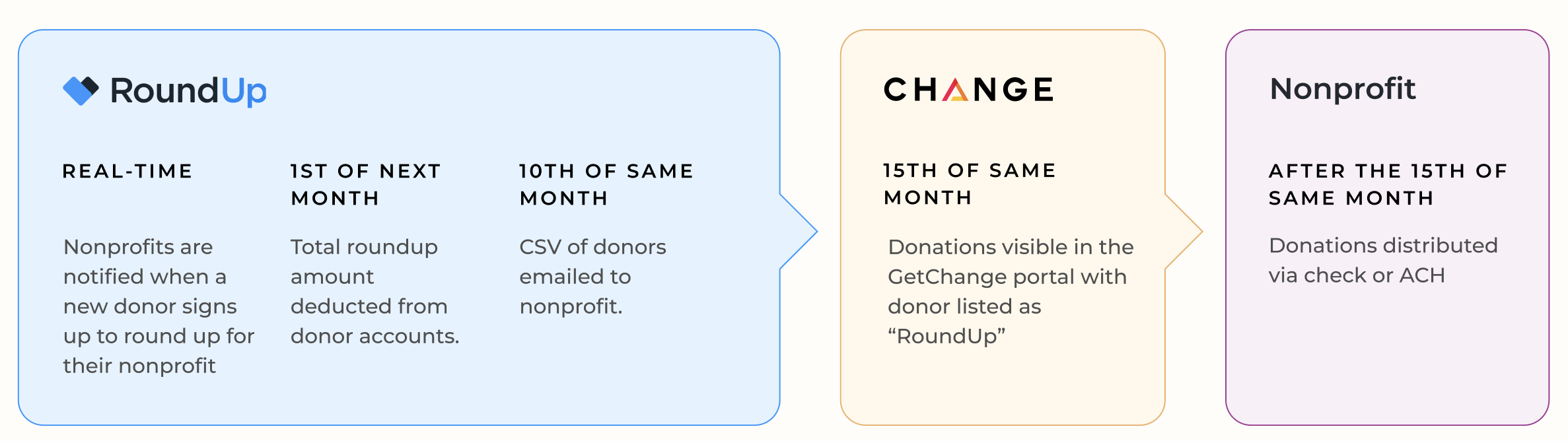
While RoundUp.org notifies nonprofits in real time when a new donor signs up, we only charge donors' cards once a month for the total of their rounded-up transactions incurred during the prior month. After donations are processed, we send a CSV file to the nonprofit admin email addresses on file that includes the donation and donor name and contact information. On or after the 15th of the month, you’ll see your “RoundUp.org” donations in the Change portal.
-
When does our nonprofit receive donations?
Donations are distributed monthly by Our Change Foundation. This typically occurs on about the 15th of each month, but can vary. Nonprofits register once to receive funds via ACH or (if preferred) by check by mail.
-
How much will our nonprofit receive?
RoundUp.org retains $2 from each monthly donation as a fundraising expense. Nonprofits never pay to participate. RoundUp.org only earns a fee if a donation is made.
There are also third-party costs associated with processing each donation. These include credit card processing fees, fees to securely obtain transaction data used to calculate roundups, and fees to process and distribute donations to nonprofits by ACH or check. These expenses are also paid out from the donated amount. Together, they total a maximum of $1.30 + 4.8% of each donation, but that amount could be lower depending on the volume of donations processed.
After all fees and processing costs, about 85% of the average donation goes to the nonprofit.
-
Are donations tax-deductible?
Yes. Donations qualify for tax deduction as allowed by law. Tax receipts are provided directly to donors.
-
Will we receive donor information?
Yes. Each month, nonprofits receive an email summary and downloadable CSV file with donor names (unless a donor chooses anonymity), email addresses, and donation amounts. This typically comes out on about the 10th of each month, after credit cards have been charged and updated with new expiration dates, etc.
-
Can we use RoundUp.org with our CRM?
Yes. The monthly CSV file can be uploaded into most donor CRM systems.
Growing your donor base
-
How do we get more donor sign-ups?
Share your RoundUp.org listing page URL via dedicated emails, social media, your website, your donation ‘thank you’ page, and at events. Create specific campaigns to get people rounding up for your nonprofit. The most effective campaigns combine the following elements:
- Dedicated email series (specific to rounding up, and only about rounding up for the nonprofit
- A time-bound campaign: “Start rounding up for us in the next 7 days
- With an incentive: “For every donor who starts rounding up in the next 7 days, there is a group of donors who will provide $100 ‘bonus’ to our nonprofit. So, sign up during the 7-day window to maximize your round ups!”
-
What if a donor already enrolled their card for another nonprofit?
Each Visa or Mastercard can only be enrolled for one nonprofit at a time, so early outreach is important before a donor links their card to another nonprofit.
Managing your listing
-
What is the Nonprofit Admin Portal?
The Admin Portal allows authorized representatives to manage and update their nonprofit’s RoundUp.org listing page, including their nonprofit name, logo, mission statement, etc.
-
How can we update or customize our listing?
Listings can be customized through the Admin Portal. To access the admin portal, log in from the site or through your listing page and follow the verification instructions. To complete verification, you’ll need to have access to an email address @domain that matches your organization’s website address on file.
-
How do we access the Admin Portal?
To access the admin portal, log in from the site or through your listing page and follow the verification instructions. To complete verification, you’ll need to have access to an email address @domain that matches your organization’s website address on file.
-
How do we remove our organization’s listing?
You may request removal by contacting support@roundup.org. Removal stops future donations but does not affect previously distributed funds. But, why would you want to block anyone from assigning your nonprofit to their Visa/Mastercard?
-
Is there a cost to manage our nonprofit listing?
No. There is no cost to access or use the Admin Portal
Help and eligibility
-
How do nonprofits get help?
Contact us at support@roundup.org.
-
What if our nonprofit is listed as ‘ineligible’ on RoundUp.org?
Eligibility is determined by checks conducted by Our Change Foundation. To learn more about why your specific is listed as “ineligible,” contact support@getchange.io.
The Recurring Donor Program
-
What is the Recurring Donor Program?
It’s a turnkey way for nonprofits to offer an incentive for their donors to sign up right away. For every 10 donors who start rounding up for your nonprofit during your 45-day signup window, RoundUp.org will provide an extra $250 reward payment to your nonprofit. Donors must continue to round up for your nonprofit for 3 consecutive months in order to qualify toward the reward payment.
We see tons of nonprofits promoting RoundUp to their donors, and being able to give them an incentive to do it now has proven to be very powerful. e.g. “For every 10 donors that start rounding up for us right now, our nonprofit will receive an extra $250 from RoundUp.org. So, please sign up right away to unlock this extra support for us.”
-
How do we get started in the Recurring Donor Program?
There’s nothing extra to enroll in. Your 45-day donor signup window opens when you verify your listing in the Admin Portal, and the Recurring Donor Program page shows a live countdown to your closing date. Every donor who chooses your organization, creates a RoundUp account, and enrolls an eligible credit card before the window closes counts as a new donor for the program.
-
Who counts as a new donor for the Recurring Donor Program?
Someone who creates a RoundUp.org account, designates your nonprofit as their organization, and enrolls an eligible credit card inside your 45-day window. Donors who joined before your window opened, who were initially recruited by another nonprofit, or who signed up after it closed still support you with their round-ups every month, but they don’t count toward your reward.
-
When does a new donor count toward our Recurring Donor Program Reward Payment?
After their third consecutive monthly donation is successfully charged and settled. Donations run on the 1st of each month, so a donor who signs up during your window typically qualifies about three months after it closes. If a donor cancels, pauses, or has a payment fail before completing three donations, they drop off and don’t count toward your reward.
-
How and when do we get paid for participation in the Recurring Donor Program?
Once your window closes, your new donors work through their three donation cycles, and the Admin Portal shows how many are still on track. When the last of them completes their third donation, we calculate your reward and contact you to get payment information. Start to finish, that’s usually about four to five months after your window opens. You earn $250 for every 10 donors who qualify, so if 52 of your donors complete their three donations, your reward payment is $1,250.
-
Do Recurring Donor Program reward payments come out of our donors’ round-ups?
No. Reward payments are funded entirely by RoundUp.org.
-
How can we track our Recurring Donor Program progress?
The Recurring Donor Program page in your Admin Portal follows you through all three stages. While your window is open, it shows days remaining, donors signed up so far, how many more you need to reach your next $250, and your maximum potential reward. After the window closes, it shows how many donors are on track to qualify, how many have dropped off, and your expected payout date. Once the reward is sent, it shows the final amount and the date the payment was sent.
-
What’s the best way to make the most of our 45-day window for the Recurring Donor Program?
Treat it like a campaign with a hard deadline, and start early. Your Admin Portal includes a ready-to-run Program Campaign Kit with a six-week playbook, five email templates, and a dozen social captions, plus your listing link and a QR code for signage and mailers. Give supporters a specific closing date, and use the countdown to send “one week left” and “final days” reminders.
Don’t see the answer to your question here? Contact us support@roundup.org.